Many small businesses attempt to track leads using CRM systems, yet they quickly encounter friction. The system requires setup, manual updates, and continuous maintenance, which creates overhead that small teams cannot sustain. As a result, tracking becomes inconsistent, and the system loses its value.
A simple AI lead tracking system without CRM complexity solves this problem by reducing structure to essential elements only. Instead of managing pipelines, custom fields, and dashboards, the system focuses on capturing, updating, and viewing lead status with minimal effort. This approach maintains visibility while removing operational burden.
What This Article Covers
This article explains how to design a lightweight lead tracking system using AI and automation. It focuses on tracking logic, data flow, and minimal structure.
It does not explain full system architecture or response automation. For a complete system design, refer to AI lead response system architecture. For execution workflows, refer to AI lead response system implementation.
Why Traditional CRM Tracking Fails for Small Businesses
Most CRM systems fail because they require manual discipline. A lead enters through email or a form, and someone must create a record, assign a stage, and update it after each interaction. This process breaks quickly in small teams where time is limited.
Over time, some leads are tracked while others are missed. Updates occur late or not at all, which creates unreliable data. The system no longer reflects reality, and the team stops using it. This pattern is explained in detail in why CRM systems fail for small businesses.
A lightweight system removes this dependency on manual updates by automating tracking at the moment of interaction.
Core Principle of a Lightweight Tracking System
A simple tracking system does not attempt to manage every detail. Instead, it tracks only what matters for daily operation. Each lead must have a clear state, and that state must update automatically.
The system relies on three core elements. First, a capture point where leads enter. Second, an update mechanism that reflects interactions. Third, a view layer that shows current status.
Once configured, the system maintains visibility without requiring manual input. This shift allows small businesses to track leads consistently without managing complex tools.
System Inputs: Capturing Leads Without Manual Entry
The system begins with input capture. Leads arrive through forms, chat, email, or calls. Each source must feed into a central tracking layer automatically.
For example, when a user submits a form, the system records the lead instantly. When a message arrives through chat, the system captures the conversation and creates a record. This removes the need to copy data into a separate system.
Structured input improves tracking accuracy. Methods described in AI lead qualification forms help ensure that each lead enters the system with usable data.
System Flow: Automatic State Updates
After capture, the system must update lead status based on actions. Each interaction triggers a change in state. This replaces manual pipeline updates with automated transitions.
For example, when a response is sent, the lead moves to “contacted.” When a meeting is scheduled, the system updates to “in progress.” If no reply occurs, the system triggers a follow up state.
This flow ensures that tracking reflects real activity. Instead of asking the team to update records, the system updates itself based on events.
Decision Logic: Defining Minimal Lead States
A lightweight system uses a small number of states. Complex pipelines reduce usability, so the system focuses on essential stages only.
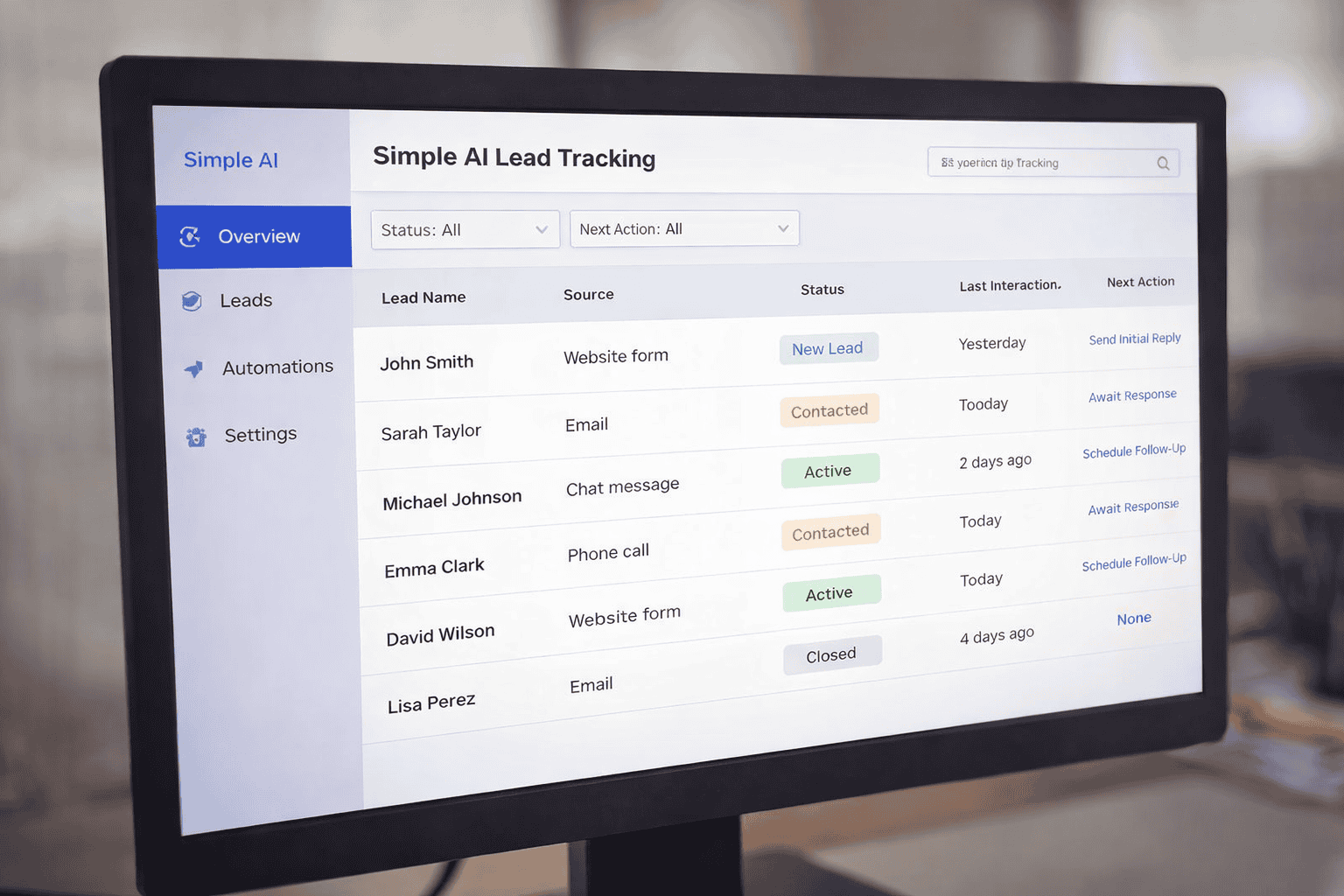
A practical structure includes new lead, contacted, active, and closed. Each state corresponds to a clear action. New lead indicates no interaction. Contacted confirms response. Active reflects ongoing interaction. Closed marks completion.
This minimal logic improves clarity. The team can view lead status instantly without interpreting complex pipelines.
Outputs: Simple Tracking View
The system must present data in a simple format. A spreadsheet, dashboard, or lightweight database can serve as the view layer. The key requirement is clarity.
Each row represents a lead, and each column reflects status, last interaction, and next action. Because updates occur automatically, the view remains current without manual effort.
This output layer replaces the need for CRM dashboards. It provides immediate visibility into which leads require attention.
Automation Layer: Connecting Events to Updates
The system depends on automation to maintain accuracy. Each event triggers an update without human intervention.
For example, a form submission creates a new entry. An email reply updates the status. A scheduled meeting changes the lead stage. Automation platforms handle these transitions.
Tools compared in Zapier vs Make vs n8n can support this layer. In this system, they act as connectors rather than central platforms.
How AI Improves Tracking Accuracy
AI enhances the system by interpreting interactions and assigning states automatically. Instead of relying on predefined rules only, AI evaluates message content and determines intent.
For example, when a lead replies with interest, AI can classify the interaction as active. When a message indicates no interest, the system can close the lead automatically.
This approach reduces ambiguity and ensures consistent classification across all leads.
Practical Implementation Flow
The system follows a simple sequence. A lead enters through a form or message. The system records the data automatically. AI analyzes the interaction and assigns a state. Automation updates the tracking view. The system monitors inactivity and triggers follow up when needed.
This flow creates a continuous loop where tracking updates in real time. Each lead remains visible without requiring manual input.
Common Mistakes in Simple Tracking Systems
One common issue involves adding unnecessary complexity. When businesses introduce too many fields or stages, the system begins to resemble a CRM and loses its simplicity.
Another issue appears when automation is incomplete. If some interactions update the system while others do not, tracking becomes inconsistent.
A third issue involves missing follow up logic. Without automated reminders, leads may remain inactive without action.
How This System Connects to the Full AI Stack
This tracking system operates as a lightweight layer within a broader structure. It does not replace response systems or automation workflows. Instead, it provides visibility.
For example, response logic described in AI prompts for first response to new leads generates communication, while this system records the interaction.
Similarly, tool ecosystems described in AI tools used in lead response systems execute actions, while this system tracks outcomes.
Optimization: Keeping the System Lightweight Over Time
As the business grows, the system must remain simple. Instead of adding features, refine existing logic. Improve input quality, adjust classification rules, and ensure automation coverage.
Monitoring key indicators such as response activity and inactive leads helps maintain system effectiveness. Continuous refinement ensures that tracking remains accurate without increasing complexity.
FAQ
What is a simple AI lead tracking system
It is a lightweight system that captures, updates, and displays lead status automatically without using a full CRM.
Why avoid CRM for lead tracking
CRM systems often require manual updates and complex configuration, which small teams struggle to maintain.
How does AI improve lead tracking
AI analyzes interactions and updates lead status automatically, which reduces manual work and improves consistency.
Can small businesses build this system easily
Yes. Using forms, automation tools, and simple dashboards, businesses can create an effective tracking system without technical complexity.
Does this replace a full lead response system
No. It complements response systems by providing visibility while other components handle communication and automation.
2 thoughts on “Simple AI Lead Tracking System Without CRM Complexity”