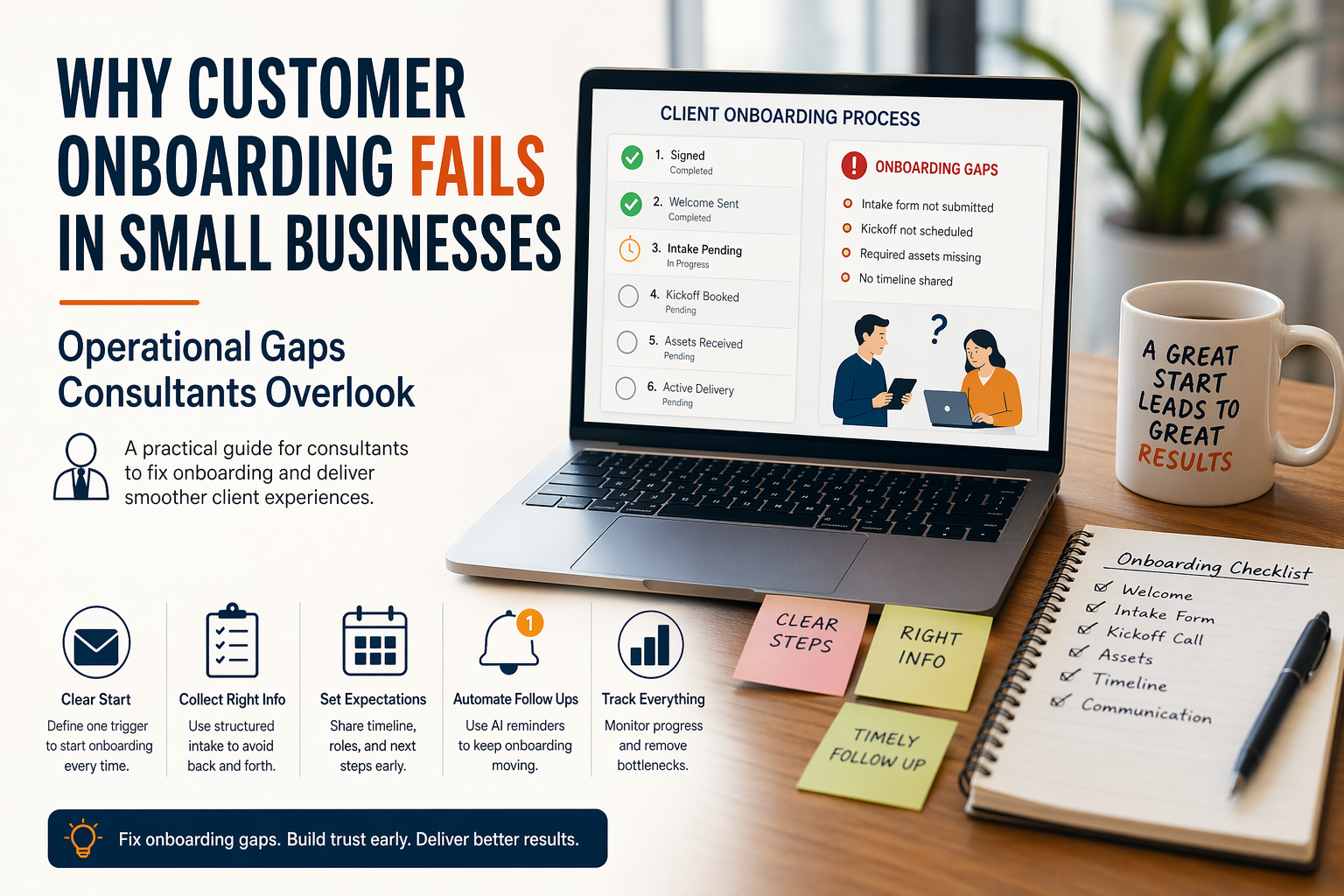
Many consultants work hard to win new clients, then lose momentum after the sale. The proposal gets accepted, payment arrives, and enthusiasm is high. Yet the first week feels disorganized. Files arrive late, meetings get delayed, expectations stay unclear, and delivery starts with confusion instead of confidence.
This is why customer onboarding fails in small businesses. The issue usually does not come from poor service quality. It comes from missing operational structure between the signed agreement and active delivery. When onboarding lacks a clear system, clients feel uncertainty, projects slow down, and consultants spend extra time fixing avoidable friction.
This article focuses on customer onboarding for consultants by examining operational gaps after client acquisition. It does not cover lead generation or sales response systems. For front end acquisition workflows, see related UsefulAIHub guides such as AI Tools for Small Consulting Businesses and Automate Lead Follow Up Sequences with AI for Consultants. This guide begins after the client says yes.
Why Customer Onboarding Matters More Than Many Consultants Expect
Clients judge professionalism early. They often decide whether they trust your process before the first deliverable is completed. If onboarding feels smooth, they assume the project is in capable hands. If onboarding feels scattered, they start asking more questions, delaying approvals, or reducing confidence.
For consultants, this stage also affects profitability. Every unclear request, repeated email, and missed document creates unpaid admin work. A strong onboarding process reduces these hidden costs while accelerating delivery.
The Core Reason Customer Onboarding Fails in Small Businesses
Small businesses often build sales processes before delivery processes. They create proposals, pricing pages, outreach systems, and booking flows because these generate revenue directly. Once the client converts, onboarding is handled manually through memory, scattered templates, or improvised emails.
That model works with a few clients. It breaks once volume increases. As soon as multiple clients start in the same month, inconsistencies appear. Some receive welcome emails immediately. Others wait days. Some get clear instructions. Others ask basic questions repeatedly.
The root cause is simple. Sales became a system. Onboarding stayed a task.
Operational Gap 1, No Defined Start Trigger
Many consultants have no formal event that starts onboarding. A signed proposal, paid invoice, verbal confirmation, or email agreement may all trigger different actions depending on the situation.
Without one clear trigger, onboarding begins inconsistently. Sometimes documents are sent after payment. Sometimes kickoff links are sent before payment. Sometimes nothing happens until the consultant remembers.
A better model uses one official trigger such as invoice paid or contract signed. Once that event happens, the same onboarding sequence starts every time.
Operational Gap 2, Missing Welcome Sequence
New clients often need immediate reassurance. They want to know what happens next, what you need from them, and when work begins. When no welcome sequence exists, silence creates uncertainty.
A short onboarding message can solve this quickly. It should confirm project start, outline the next steps, list required materials, and provide timelines. This reduces back and forth communication while setting a professional tone.
Without that message, clients often send follow up questions within the first 24 hours.
Operational Gap 3, Unclear Information Collection
Consultants frequently need assets before work starts. These may include brand files, access credentials, analytics permissions, previous reports, stakeholder contacts, or business goals.
When requests are sent across multiple emails, clients miss items or send incomplete information. Work then stalls while the consultant chases missing inputs.
Use one structured intake form or checklist instead. Centralized collection saves time and reduces project delays. This follows the same structured input logic seen in lead qualification systems already covered on UsefulAIHub.
Operational Gap 4, No Ownership or Responsibilities
Many onboarding problems come from role confusion. The consultant expects the client to provide assets quickly. The client assumes the consultant will request each item personally. Internal stakeholders may not know who approves decisions.
When ownership stays vague, deadlines slip immediately.
Define responsibilities early. Clarify who sends materials, who approves drafts, who attends meetings, and who handles billing communication. Clear ownership reduces friction later.
Operational Gap 5, Weak Timeline Expectations
Clients become frustrated when they do not know when milestones occur. Even if work is progressing correctly, lack of visibility feels like inactivity.
During onboarding, provide a simple timeline. Include kickoff date, discovery phase, first draft timing, review windows, and expected delivery milestones. This creates confidence and lowers unnecessary status requests.
Operational Gap 6, Tool Chaos
Some consultants use one tool for contracts, another for forms, another for chat, another for files, and another for task management without clear coordination. Clients then receive links from five platforms in two days.
Too many tools increase friction during onboarding. Clients spend energy learning systems instead of moving the project forward.
Use a lean stack. Choose tools with distinct roles. One communication channel, one document hub, one intake system, and one meeting tool are often enough.
If you are evaluating automation platforms, see Choose Zapier, Make, or n8n for Small Business.
Operational Gap 7, Manual Follow Up After Silence
Clients sometimes delay forms, files, or meeting bookings. When follow up depends on memory, onboarding stalls quietly.
This is where automation creates immediate value. If no intake form is completed within two days, send a reminder. If kickoff is not booked, trigger another prompt. If assets remain missing, notify the consultant.
Small delays compound into lost weeks. Automated nudges keep momentum without adding manual workload.
Operational Gap 8, No Internal Tracking Layer
Some consultants onboard clients through inboxes alone. They cannot quickly see which client completed forms, who booked kickoff, or which project is blocked.
A simple tracking board solves this. Use statuses such as:
- Signed
- Welcome Sent
- Intake Pending
- Kickoff Booked
- Assets Received
- Active Delivery
This lightweight visibility model mirrors the tracking principles used in simple lead systems, but applied to post sale operations.
How AI Improves Customer Onboarding for Consultants
AI does not replace your consulting expertise. It improves consistency and speed in repetitive onboarding steps.
Practical examples include:
- Generating personalized welcome emails from proposal data
- Summarizing intake responses into project briefs
- Drafting kickoff agendas automatically
- Classifying missing assets and creating reminders
- Answering common onboarding questions instantly
This turns onboarding from reactive admin work into a controlled operational sequence.
A Simple Customer Onboarding System for Small Consulting Businesses
The workflow below shows how a structured onboarding system moves clients from signed agreement to active delivery.
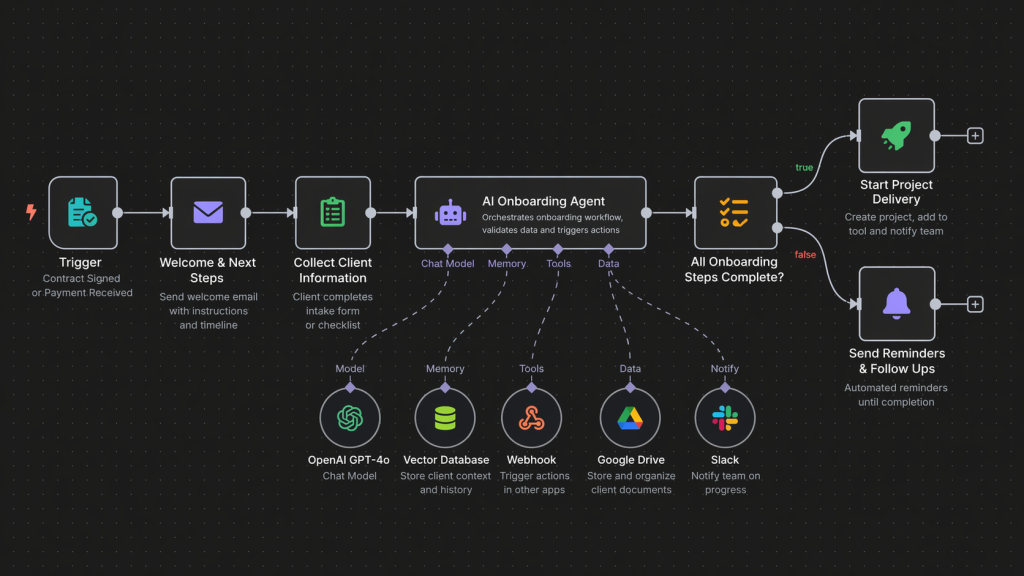
Step 1. Contract signed or invoice paid triggers onboarding.
Step 2. Client receives welcome email with next steps.
Step 3. Intake form collects goals, access, stakeholders, and deadlines.
Step 4. Client books kickoff meeting through scheduling link.
Step 5. AI summarizes responses into internal brief.
Step 6. Status board updates automatically.
Step 7. Reminder workflows activate if steps remain incomplete.
Step 8. Project moves to delivery once requirements are complete.
How to Audit Your Current Onboarding in 15 Minutes
Ask these questions:
- What exact event starts onboarding
- Do all clients receive the same welcome process
- How do you collect required information
- Can you see onboarding status instantly
- What reminders run automatically
- Where do projects usually stall
If several answers are unclear, your onboarding relies on memory instead of systems.
FAQ
Why does customer onboarding fail in small businesses?
It usually fails because no clear process exists after the sale. Tasks depend on memory, manual emails, and inconsistent follow up.
Why is onboarding important for consultants?
It shapes first impressions, speeds delivery, reduces admin time, and increases client confidence early in the engagement.
Can AI help customer onboarding?
Yes. AI can automate welcome communication, summarize forms, trigger reminders, and organize onboarding data.
What is the best onboarding tool for consultants?
There is no single best tool. A simple combination of forms, scheduling, tracking, and automation often works better than a complex stack.
How long should onboarding take?
For many consulting offers, the core onboarding phase should complete within two to five business days so delivery can begin quickly.
Final Operational Shift
Customer onboarding fails in small businesses when growth outpaces process maturity. Consultants often optimize acquisition first and postpone delivery operations. The fix is not more effort. The fix is a repeatable onboarding system that starts instantly, collects inputs clearly, tracks progress, and keeps momentum from day one.
2 thoughts on “Why Customer Onboarding Fails in Small Businesses, Operational Gaps Consultants Overlook”