Winning a new client often feels like the hardest part of consulting. Yet many delivery problems begin after the agreement is signed. Files arrive late, kickoff calls take days to schedule, expectations stay unclear, and the first week turns into unnecessary admin work. This is where many consultants lose momentum, trust, and profitable time.
How to automate client onboarding step by step means building a clear execution system that starts the moment a client says yes. Instead of relying on memory, scattered emails, and manual follow ups, the process uses triggers, forms, scheduling logic, reminders, and AI support to move clients into active delivery quickly.
Quick Summary
Why Manual Onboarding Slows Growth
Many consultants improve lead generation first, then leave onboarding informal. They may have polished proposals and strong sales calls, yet once payment arrives the next steps depend on inbox management and memory. One client receives fast onboarding, while another waits two days for instructions.
The cost is larger than it appears. Delayed starts reduce confidence, increase clarification messages, and push delivery dates forward. Repeated across several monthly clients, these delays lower capacity and consume unpaid hours.
If your current issue starts before the sale, review AI lead response system implementation. This guide begins after the client commits.
What to Prepare Before Choosing Tools
Automation works best when the workflow is clear before software enters the picture. Start by defining one official onboarding trigger. Most consultants choose invoice paid or contract signed. Once this event happens, the same sequence should begin every time.
Next, define the minimum information required to start delivery. This often includes goals, stakeholders, access credentials, assets, deadlines, and preferred communication channels.
Then create simple visible stages such as Signed, Welcome Sent, Intake Pending, Kickoff Booked, Assets Received, and Active Delivery. These labels make delays visible immediately and keep progress easy to track.
How to Automate Client Onboarding Step by Step
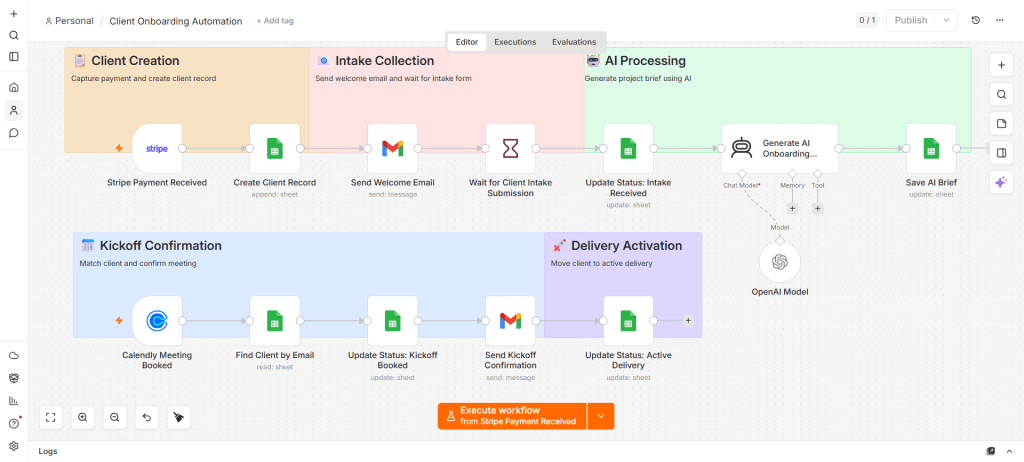
Step 1. Trigger the Workflow Automatically
Connect your payment tool, proposal platform, or contract software to an automation platform. Once the trigger occurs, create the client record instantly inside your tracking board or CRM. This removes the common delay where onboarding starts only when you remember to begin.
Step 2. Send a Welcome Email Immediately
The first message should confirm project start, explain the process, and reduce uncertainty. It should tell the client what happens next, what you need from them, and when the kickoff phase begins. Immediate reassurance improves first impressions and reduces avoidable follow up emails.
Step 3. Collect Intake Information Through One Form
Instead of asking for details across several messages, use one structured intake form. Ask only for delivery critical information such as objectives, target audience, competitors, access needs, and approval contacts.
Clean structured inputs help later automation and save review time. If you need stronger form logic, review AI lead qualification forms for small business, since many principles also apply to onboarding inputs.
Step 4. Let Clients Book the Kickoff Call
Use a live booking link connected to your calendar. Set buffers, available hours, and meeting duration in advance. Once booked, confirmations and reminders should run automatically. If scheduling is still manual, your onboarding flow slows at one of the highest momentum moments.
For deeper setup logic, see AI workflows automating appointment booking.
Step 5. Generate an Internal Project Brief
Once the form is completed, convert raw answers into a usable brief. Summarize objectives, priority deliverables, deadlines, stakeholders, missing assets, and potential risks. This shortens the distance between intake and execution.
Step 6. Run Reminder Logic Automatically
Most onboarding delays come from inactivity. Build reminder sequences for common stalls. If no intake form arrives after two days, send a prompt. If no kickoff booking happens after three days, send another message. If assets remain missing, notify the consultant directly.
Small nudges preserve momentum without manual chasing.
Step 7. Move the Client Into Delivery
Once all requirements are complete, automatically update status to Active Delivery, notify collaborators if needed, and send the next milestone communication. This creates a clean handoff instead of a vague transition.
Where AI Saves the Most Time
AI creates the most value when it supports repetitive coordination. It can personalize welcome emails using proposal data, summarize intake responses into a project brief, draft kickoff agendas, flag missing information, and prepare concise status updates.
If you want stronger execution agents beyond simple automations, explore Claude Code automate lead management workflows. The same execution model can support onboarding operations.
Simple Tool Stack for Consultants
You do not need enterprise software. A lean setup often performs better. Use one form tool for intake, one scheduler for meetings, one email platform for communication, one automation platform for triggers, one AI assistant for summaries, and one lightweight board or spreadsheet for tracking.
If choosing connectors, compare options in Choose Zapier, Make, or n8n for Small Business.
Mistakes That Quietly Delay Projects
No single trigger creates inconsistent starts. Too many tools create friction for clients. Lack of visibility hides stalled accounts. Long intake forms lower completion rates. Using AI only for writing emails misses the operational benefit of connected workflows.
If onboarding problems already exist today, read Why customer onboarding fails in small businesses.
How to Launch Your System in 7 Days
Use the first day to choose your trigger and map the stages. On the second day, build the intake form. On the third day, connect scheduling and test availability rules. On day four, write welcome, reminder, and confirmation templates.
Use day five to build the tracking board and status automation. On day six, run a test client through the full system. On day seven, launch with the next real client and refine based on real usage.
30 Minute Audit of Your Current Process
Ask yourself what exact event starts onboarding, whether all clients receive the same next steps, how you collect assets, whether stalled accounts are visible instantly, which reminders run automatically, and where week one usually slows down.
If several answers are unclear, your process still depends on memory more than systems.
FAQ
What is automated client onboarding for consultants?
It is a structured workflow that starts after a client signs or pays, then handles welcome communication, intake, scheduling, reminders, tracking, and handoff to delivery.
How long should consultant onboarding take?
For many consulting offers, core onboarding should finish within two to five business days.
Do I need a CRM for onboarding?
No. Many consultants use a spreadsheet or lightweight board successfully when statuses update automatically.
Can AI replace human onboarding?
No. AI supports coordination and preparation. Consultants still manage strategy, trust, and decisions.
What is the fastest first improvement?
Choose one trigger, one intake form, and one booking link. That alone removes many delays.
Operational Shift
How to automate client onboarding step by step comes down to replacing scattered tasks with one controlled sequence. Once a client commits, the system should welcome them, collect inputs, schedule kickoff, track progress, and move them into delivery without friction. That shift saves time, improves trust, and gives consultants more capacity without adding staff.
4 thoughts on “How to Automate Client Onboarding Step by Step for Consultants”