Many consultants lose time rewriting client updates because reports lack structure, context, and consistency. Information often exists across emails, meeting notes, spreadsheets, and messaging tools, yet the final report still feels incomplete or difficult to understand. AI prompts can solve this issue when they are designed around structured outputs instead of generic text generation.
Summary
Consultants often spend hours rewriting reports because updates come from disconnected sources such as meetings, emails, dashboards, and project tools. Structured AI prompts help organize this information into consistent client reports with clear summaries, action tracking, blockers, KPIs, and next steps. A properly designed prompt system improves readability, reduces revision cycles, and creates more reliable communication across recurring client operations.
Why Client Reports Often Create Operational Friction
Many consulting teams assume the reporting problem comes from poor writing. In practice, the issue usually starts earlier in the operational process. Client updates often depend on fragmented information collected from meetings, Slack messages, CRM notes, project tools, and spreadsheets. Once this information reaches the reporting stage, consultants manually summarize it under time pressure.
As a result, reports become inconsistent. Some updates focus heavily on completed tasks while others emphasize strategy discussions or future actions. Clients then struggle to identify priorities, blockers, timelines, or ownership responsibilities. This creates unnecessary follow-up meetings and repeated clarification requests.
AI can improve this process when prompts enforce structure before generation begins. Instead of asking an AI system to “write a professional report,” consultants can define sections, logic rules, formatting expectations, and decision priorities directly inside the prompt system.
How Structured AI Reporting Differs From Generic Prompting
Generic prompts usually create polished text but weak operational clarity. The output may sound professional while still hiding missing information, unclear priorities, or incomplete status tracking. Structured prompting changes the role of AI from text generator to reporting framework.
In practice, structured prompts define:
- Required sections.
- Output sequence.
- Decision logic.
- Formatting constraints.
- Status categorization.
- Action ownership.
- Risk identification.
- Timeline interpretation.
Once configured correctly, the AI model starts organizing information according to operational logic rather than conversational flow. This distinction matters because clients usually scan reports for decisions, delays, next actions, and measurable progress.
Consultants who already use AI for onboarding communication can extend the same operational approach into reporting systems. For example, AI Workflow for Managing Client Expectations explains how structured communication reduces misunderstandings across service delivery stages.
The Real Problem With AI Generated Reports
Many consultants already use ChatGPT, Claude, or Gemini for reports. However, most implementations fail because prompts remain too broad. The AI receives large blocks of context without prioritization logic. This causes several operational issues.
Missing Priorities
AI systems often summarize information equally, even when some updates matter more than others. A delayed deliverable may appear beside a minor discussion point without urgency differentiation.
Inconsistent Formatting
Different reports use different structures depending on who generated them. Clients then spend additional time locating key information.
Weak Accountability Tracking
Reports frequently mention tasks without assigning owners, deadlines, or completion status. This weakens project visibility.
Excessive Narrative Text
Some AI outputs contain long explanations that reduce readability. Consultants then manually edit the content before sending it.
Structured prompt systems solve these problems by forcing reporting consistency at generation level instead of editing level.
The Core Components of an AI Reporting Prompt System
An effective reporting prompt usually contains six operational layers. Each layer controls a different part of the final output.
1. Context Layer
This section explains the business context, client type, reporting period, and project scope. The AI uses this information to interpret priorities correctly.
Example:
You are generating a weekly consulting update for a marketing agency client managing paid advertising campaigns across Meta and Google Ads.
2. Output Structure Layer
This layer defines the exact sections required inside the report.
Example:
Create the report using these sections only:
1. Executive Summary
2. Completed Actions
3. Active Blockers
4. Performance Metrics
5. Decisions Needed
6. Next Week Priorities
3. Prioritization Logic Layer
This part explains how the AI should rank information.
Example:
Prioritize delays, risks, and client action dependencies above informational updates.
4. Formatting Layer
This section controls readability and consistency.
Example:
Use bullet points for actions. Keep summaries under 120 words. Highlight blockers separately.
5. Operational Constraints Layer
This layer prevents vague outputs.
Example:
Do not invent metrics. Mark missing information as “data unavailable.”
6. Tone Layer
The final layer controls communication style.
Example:
Maintain a concise consulting tone focused on operational clarity.
Practical Prompt Template for Weekly Client Updates
The following structure works well for consultants managing recurring client reporting.
You are generating a weekly client operations report.

Client Type:
[Insert client industry]

Reporting Period:
[Insert dates]

Objective:
Summarize operational progress, blockers, metrics, and next actions clearly.

Use this exact structure:

1. Executive Summary
Summarize the week in under 120 words.

2. Completed Actions
List completed tasks with measurable outcomes.

3. Current Blockers
Explain issues affecting delivery, timelines, or approvals.

4. Metrics and KPIs
Present key numbers in bullet format.

5. Decisions Required From Client
List pending approvals or inputs.

6. Next Week Priorities
List planned actions in priority order.

Rules:
Avoid generic language.
Do not repeat information.
Use concise operational wording.
Flag missing information clearly.
Once integrated into a workflow, this structure dramatically reduces editing time because the AI follows predefined reporting logic.
How Consultants Can Build an Automated Reporting Workflow
Prompt quality improves significantly when integrated into a structured workflow. Instead of manually gathering information before every report, consultants can centralize operational data automatically.
A simple workflow may include:
- Meeting transcripts from Zoom or Google Meet.
- Task updates from Trello, ClickUp, or Asana.
- Metrics from Google Analytics or Looker Studio.
- Client messages from Slack or Gmail.
- Project notes from Notion.
Once connected, automation tools such as n8n or Zapier can consolidate this information before sending it into an AI reporting prompt.
For consultants building broader operational systems, How to Choose Between Zapier and Make and n8n for Small Business explains how workflow platforms affect scalability and maintenance.
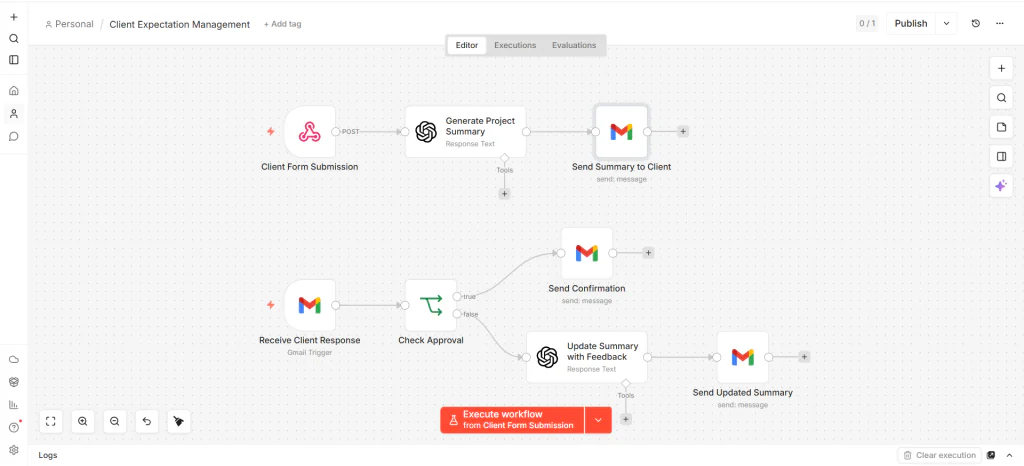
Example Workflow Architecture
Step 1. Data Collection
The workflow pulls completed tasks from project management software, extracts meeting summaries from transcripts, and collects KPI data from dashboards.
Step 2. Data Normalization
Automation tools reformat the collected information into structured fields such as:
- Completed tasks.
- Pending approvals.
- Metrics.
- Risks.
- Client dependencies.
Step 3. Prompt Injection
The workflow inserts these fields into a predefined AI reporting prompt.
Step 4. AI Report Generation
The AI produces the final report using the predefined structure.
Step 5. Human Validation
The consultant quickly reviews the report before delivery.
This workflow matters because it transforms reporting from a manual writing task into an operational system.
Why Structured Outputs Improve Client Confidence
Clients usually evaluate consulting quality through communication clarity and execution visibility. Even strong operational work can appear disorganized when reporting lacks consistency.
Structured outputs improve confidence because clients immediately understand:
- What changed.
- What remains blocked.
- Who owns the next action.
- What decisions require approval.
- How progress connects to objectives.
In practice, this reduces unnecessary clarification meetings and lowers communication friction across long projects.
Consultants handling complex client relationships often face expectation management problems during reporting cycles. Related operational issues appear in Why Clients Drop After Onboarding, especially when visibility decreases after initial setup phases.
Using AI Prompts for Different Reporting Scenarios
Different consulting environments require different reporting structures. A marketing consultant and an operations consultant rarely communicate identical metrics or priorities.
Marketing Performance Reports
Marketing consultants usually prioritize:
- Campaign performance.
- Lead generation metrics.
- Ad spend efficiency.
- Creative testing results.
Prompt systems should emphasize measurable outcomes and campaign changes.
Operations Consulting Reports
Operations consultants often prioritize:
- Workflow bottlenecks.
- System implementation stages.
- Automation progress.
- Operational risks.
The prompt logic should focus more heavily on dependencies and blockers.
Freelance Service Reports
Freelancers typically need simpler reporting structures with:
- Task completion.
- Revision tracking.
- Timeline visibility.
- Pending approvals.
The reporting system should remain lightweight while preserving clarity.
Prompt Variations for Different Client Types
Executive Client Version
Executives usually prefer concise strategic summaries.
Summarize the report for executive review.
Focus on risks, outcomes, and decisions.
Keep the total report under 300 words.
Operational Team Version
Operational teams often require implementation detail.
Include detailed task status, blockers, dependencies, and ownership tracking.
Use categorized bullet points.
Technical Client Version
Technical stakeholders usually need system level visibility.
Highlight implementation status, API issues, workflow failures, and system dependencies.
Use technical terminology where appropriate.
These variations matter because reporting clarity depends heavily on audience alignment.
Common Prompt Design Mistakes
Using Generic Instructions
Prompts such as “write a professional report” produce inconsistent results because they lack operational guidance.
Ignoring Missing Data
Some prompts encourage AI hallucination unintentionally by failing to define behavior for incomplete information.
Combining Too Many Objectives
Reports become confusing when prompts request strategic analysis, motivational language, technical detail, and executive summaries simultaneously.
Overloading the Context Window
Large unstructured context blocks reduce output consistency. Structured input fields usually perform better.
Skipping Validation
Even strong prompt systems require human review before sending reports to clients.
How to Improve AI Reporting Accuracy Over Time
Prompt systems improve through operational iteration. Consultants should continuously evaluate report quality using real client interactions.
Useful optimization signals include:
- Client clarification frequency.
- Revision requests.
- Approval delays.
- Meeting repetition.
- Misunderstood priorities.
Once recurring communication issues appear, consultants can modify prompt logic directly instead of rewriting reports manually each week.
For example, repeated confusion around ownership may require adding a dedicated “responsible party” field to every task section.
Integrating AI Reports Into Broader Client Systems
Reporting systems work best when connected to broader communication and workflow infrastructures.
Consultants managing client operations often combine:
- Client onboarding workflows.
- Task management systems.
- Approval tracking.
- Document sharing automation.
- Meeting summaries.
- Lead management systems.
As these systems become connected, reports evolve from static updates into operational visibility layers.
For document coordination workflows, How to Automate Document Sharing and Access for Clients With AI explains how structured access systems reduce communication delays.
FAQ
Can AI generate client reports automatically?
Yes. AI can generate structured client reports automatically when connected to organized operational data sources such as project management tools, meeting transcripts, and analytics dashboards. Human review still improves accuracy and accountability.
What is the best AI prompt structure for consulting reports?
The best structure usually includes context, report sections, prioritization logic, formatting rules, operational constraints, and tone instructions. This creates more consistent and actionable outputs.
Why do AI generated reports sometimes feel vague?
Most vague outputs result from generic prompts without operational logic. The AI receives information but lacks prioritization instructions, formatting rules, and accountability structures.
Can consultants automate weekly reports with n8n or Zapier?
Yes. Consultants can use automation platforms to collect data from project tools, analytics dashboards, and communication systems before generating structured AI reports automatically.
Should AI reports replace manual reporting entirely?
AI reporting systems work best as operational accelerators rather than full replacements. Human review remains important for strategic interpretation, relationship context, and decision validation.
Final Operational Perspective
AI reporting systems create value when they improve operational clarity rather than producing polished text alone. Consultants who structure prompts around visibility, accountability, and decision tracking usually achieve better client communication outcomes than those relying on generic AI writing instructions.
Once prompts define reporting logic clearly, the AI becomes part of the operational workflow instead of functioning as a standalone writing assistant. This distinction changes reporting from a repetitive manual activity into a scalable communication system that supports long term consulting relationships.