Manual document sharing slows down onboarding, approvals, and project execution for many small businesses. Teams often send files manually through email threads, messaging apps, or scattered cloud folders without a structured process. As client activity increases, employees spend more time locating files, updating permissions, resending links, and answering repeated access requests. These repetitive tasks reduce operational efficiency and create unnecessary delays across projects.
An automated document sharing system solves this problem by organizing file delivery, permissions, notifications, and access tracking inside one structured workflow. Instead of relying on manual coordination, SMBs can use AI assisted automation to create client folders, deliver files automatically, manage permissions, and monitor activity with minimal administrative work.
This guide explains how SMBs can automate document sharing and client access using AI workflows, cloud storage, and automation platforms such as n8n. It covers folder organization, automated permissions, secure file delivery, reminder systems, and access tracking. The article also includes a practical n8n workflow example with screenshots that demonstrate how the automation works in a real operational setup.
Why Manual File Sharing Creates Operational Problems
Many SMBs begin with a simple workflow. A client requests onboarding documents, contracts, reports, or deliverables. Someone on the team uploads the files manually, copies sharing links, configures permissions, and sends an email. This process appears manageable during the early stages of a business. However, operational problems appear once the company handles multiple clients simultaneously.
Employees often lose track of which version was sent, whether permissions were configured correctly, or whether the client even opened the documents. Teams repeatedly interrupt their work to resend files or update access manually. As a result, onboarding slows down and project coordination becomes inconsistent.
These issues also affect operational security. Businesses sometimes forget to remove access from old collaborators or accidentally expose folders publicly. Without a standardized workflow, document management becomes difficult to scale.
Several onboarding and communication issues discussed in Why Customer Onboarding Fails in Small Businesses and How to Automate Client Onboarding Step by Step originate from these same operational bottlenecks.
How AI Changes the Document Sharing Process
AI improves document workflows by reducing repetitive coordination tasks and supporting structured communication. The automation platform still handles the operational logic, while AI enhances organization, messaging, and classification.
For example, AI can generate onboarding summaries, personalize delivery instructions, categorize uploaded documents, and detect missing files automatically. Instead of manually preparing every communication step, businesses can standardize delivery while keeping interactions personalized.
This creates a workflow where clients receive organized access immediately after triggering events occur. At the same time, internal teams gain better visibility into approvals, uploads, and pending actions.
What This Workflow Covers
This implementation focuses specifically on automating document sharing and access management for clients. The workflow handles:
- Folder creation
- Document delivery
- Permission assignment
- Automated emails
- Access tracking
- Reminder automation
This article does not cover full CRM implementation, advanced project management systems, or complete onboarding architecture. For broader onboarding systems, see AI Client Onboarding Systems for Service Businesses and Freelancers.
The Simplest Operational Workflow
Most SMBs do not need large automation architectures to improve document delivery. A lightweight workflow with a small number of nodes already solves most operational problems.
The workflow begins when a client completes an onboarding action such as:
- Submitting a form
- Signing a proposal
- Completing payment
- Approving a project
Once triggered, the system automatically creates organized storage, assigns permissions, and sends files to the client.
Core Workflow Logic
- Client action triggers workflow
- Client folder is generated
- Documents are uploaded or copied
- Permissions are configured
- Secure links are created
- Client email is sent
- Workflow tracks access activity
- Reminder automation handles inactivity
This structure keeps the workflow simple while covering the most important operational stages.
Recommended Tool Stack
Automation Platform
n8n works well for this implementation because it supports flexible workflow design, conditional logic, and integrations with storage providers. SMBs looking for simpler setup may also use Zapier or Make depending on their operational requirements.
If you are comparing automation platforms, see How to Choose Between Zapier, Make, and n8n for Small Businesses.
Cloud Storage
Google Drive remains a practical option because it supports structured permissions and strong integration compatibility. Dropbox and OneDrive can support similar workflows depending on the existing business environment.
Email Delivery
Gmail or Outlook can deliver automated sharing emails. AI generated messaging can personalize communication depending on onboarding responses or project types.
Optional AI Layer
AI can improve onboarding summaries, file explanations, and reminder messaging without adding operational complexity.
Step 1. Create a Standardized Folder Structure
Automation depends heavily on predictable organization. Before building workflows, define a consistent folder structure that every client follows.
A common structure includes:
- Contracts
- Invoices
- Assets
- Reports
- Deliverables
Once standardized, the automation platform can generate folders dynamically using the client name or project identifier.
Clients/
 └── Client Name/
      ├── Contracts
      ├── Assets
      ├── Reports
      └── Deliverables
This structure reduces confusion and ensures that workflow logic remains stable as client volume increases.
Step 2. Configure the Trigger
The trigger determines when the workflow begins. SMBs often overcomplicate this stage by combining too many conditions. One reliable trigger works better operationally.
Common trigger examples include:
- Form submission
- Payment confirmation
- Signed agreement
- CRM status update
- Project approval
For example, after a client submits an onboarding form, the workflow immediately creates folders and delivers onboarding documents automatically.
Businesses already using AI intake systems can connect those systems directly to this workflow. Related setup guidance appears in Client Intake Systems Using AI Forms.
Step 3. Automate Document Delivery
After identifying the client, the workflow prepares and delivers files automatically.
The system can:
- Copy onboarding templates
- Generate documents dynamically
- Upload predefined files
- Create client specific folders
Typical onboarding documents include:
- Service agreements
- Project timelines
- Questionnaires
- Brand asset requests
- Welcome guides
Instead of preparing these manually for every client, the workflow handles the process automatically. This reduces repetitive administrative work significantly.
Step 4. Configure Access Permissions
Permission management becomes risky when teams handle it manually. Businesses often forget to remove access or assign incorrect visibility settings.
The workflow solves this problem by applying predefined permission rules automatically.
Examples include:
- View only permissions for invoices
- Edit permissions for collaborative assets
- Restricted access for internal documents
- Temporary access expiration for contractors
As a result, document access remains consistent and operational security improves.
Step 5. Send Automated Emails
Once documents are ready, the workflow sends an automated email containing sharing links and instructions.
The message usually explains:
- Which files are included
- What the client must review
- Where uploads should be placed
- Important deadlines
- How to request support
AI can personalize these emails dynamically using onboarding information. This keeps communication organized while reducing manual writing work.
For onboarding communication examples, see AI Prompts for Onboarding Emails and Client Data Collection.
Step 6. Add Access Monitoring and Reminder Logic
Sending documents does not guarantee progress. Clients sometimes ignore emails, forget uploads, or postpone approvals.
The workflow can monitor activity automatically and trigger reminders when required.
Examples include:
- No document access after 48 hours
- No uploaded assets after several days
- No signed agreement after delivery
Instead of manually checking every client status, the workflow handles operational follow ups automatically. This keeps onboarding moving forward without increasing administrative workload.
Practical n8n Workflow Example
The following example demonstrates a lightweight n8n implementation that automates document sharing and access management for new clients.
Simple n8n Structure
This implementation works best as one simple workflow with minimal nodes. The objective is operational clarity rather than technical complexity.
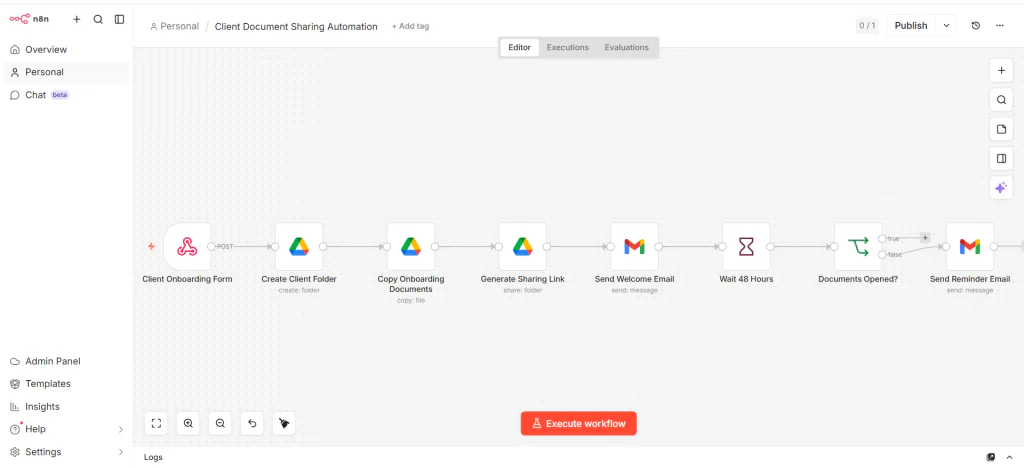
✨ Minimal Workflow Structure
Example of a lightweight n8n workflow used to automate document sharing, permission management, and onboarding communication for SMB clients.
When Two Workflows Make More Sense
One workflow remains enough for most SMB operations. However, larger businesses may separate delivery and monitoring into independent workflows for easier maintenance.
Workflow 1
- Create folders
- Upload documents
- Assign permissions
- Send emails
Workflow 2
- Track activity
- Check missing uploads
- Send reminders
- Update internal systems
This separation reduces debugging complexity because each workflow handles one operational responsibility only.
Operational Benefits for SMBs
Faster Client Onboarding
Clients receive immediate access to documents after onboarding actions occur.
Lower Administrative Workload
Teams spend less time resending files and updating permissions manually.
Better Operational Consistency
Every client receives the same organized delivery process.
Improved Security
Permission rules remain standardized across all projects.
Scalable Operations
The workflow supports higher client volume without proportional increases in administrative work.
Common Implementation Mistakes
Overcomplicated Workflow Design
Many SMBs build large automation systems too early. Simpler workflows remain easier to maintain and troubleshoot.
Unstructured File Organization
Without predictable folder naming, automation logic eventually breaks.
Manual Permission Overrides
Repeated manual changes reduce consistency and create operational risks.
No Reminder Logic
Projects still stall when workflows fail to monitor inactivity.
FAQ
What is the easiest way to automate document sharing?
The simplest method combines cloud storage, an automation platform, and automated email delivery inside one workflow.
Can SMBs automate document access without a CRM?
Yes. Many SMBs use forms, onboarding systems, or payment triggers without implementing full CRM platforms.
Why is n8n useful for document sharing workflows?
n8n supports flexible workflow design, integrations, and operational automation without requiring enterprise infrastructure.
Should SMBs use one workflow or multiple workflows?
Most SMBs can use one workflow successfully. Larger operations may separate monitoring and delivery for easier maintenance.
Final Operational Perspective
Automating document sharing and access management removes repetitive operational work that slows onboarding and project coordination. SMBs gain faster delivery, better organization, and more consistent communication without increasing administrative workload.
The most effective workflows remain simple. A lightweight automation with structured folders, automated permissions, and reminder logic already solves most operational bottlenecks. Once this operational foundation becomes stable, businesses can gradually expand the system with AI assisted communication and monitoring features.