Consultants often face delays, revisions, and client frustration because expectations shift during execution. This issue rarely comes from lack of skill. It usually comes from how communication is handled. When messages stay informal, scattered, and reactive, expectations become unstable. As a result, projects drift away from their original scope.
This system structures client communication into defined stages that capture expectations, validate scope, and track changes. It uses AI to summarize inputs, detect gaps, and maintain alignment. Consultants reduce revisions, improve delivery speed, and prevent scope drift by turning communication into a managed workflow instead of reactive exchanges.
An AI workflow changes this dynamic by turning communication into a controlled system. Instead of relying on emails, calls, and memory, it introduces structured inputs, automated summaries, and validation checkpoints. Each interaction becomes part of a trackable process that maintains alignment from start to finish.
This article focuses on managing client expectations during project execution through structured communication systems. It does not cover initial onboarding automation or tool-specific setup.
For onboarding workflows, refer to this implementation guide. For AI tools used in onboarding systems, see this tool overview.
Why Client Expectations Break During Projects
Expectation misalignment often starts early. When a client explains their needs informally, they leave gaps without realizing it. The consultant interprets those gaps based on experience, which creates assumptions. Over time, these assumptions become visible through feedback, and by then, correcting them requires rework.
At the same time, communication spreads across multiple channels. Emails contain partial information, messages hold updates, and calls include undocumented decisions. This fragmentation makes it difficult to maintain a single source of truth. As a result, consultants lose clarity on what was agreed upon.
Late feedback also plays a critical role. When clients review work after several steps instead of at structured checkpoints, they introduce changes that affect previous work. This increases revision cycles and delays delivery.
AI addresses these issues by structuring communication, extracting key information, and identifying inconsistencies early. It creates a system where expectations are not assumed but defined and validated continuously.
How AI Changes the Communication Process
In a traditional workflow, consultants interpret client input manually. This process depends on experience, attention, and memory. Even with strong skills, inconsistencies appear because each interaction is handled differently.
When AI is integrated into the workflow, it standardizes how information is processed. It converts raw input into structured summaries, highlights missing elements, and compares feedback against original expectations. This reduces variability and ensures consistency across projects.
As a result, consultants shift from reactive communication to controlled execution. Instead of adjusting after issues appear, they detect and prevent them early.
System Inputs: Capturing Expectations with Precision
The workflow starts with structured inputs. Instead of relying on open conversations, the system collects specific data points that define expectations clearly. These inputs include project goals, constraints, success criteria, communication preferences, and approval rules.
Structured forms or guided prompts help collect this data. Once submitted, AI processes the input and extracts key elements. It identifies priorities, detects missing information, and organizes everything into a clear baseline.
This step builds the foundation of the system. Without it, later validation becomes ineffective because there is no reliable reference point.
For structured data collection methods, refer to client intake systems, which focus on gathering initial information before onboarding begins.
System Flow: Managing Expectations Step by Step
1. Expectation Summary
Once the system receives input, AI generates a structured summary that translates raw data into a clear project definition. This summary outlines goals, deliverables, constraints, and timelines. The consultant reviews this output before sending it to the client.
The client then validates this document. This step ensures both sides agree on the same interpretation before execution begins. It eliminates hidden assumptions and establishes a shared understanding.
2. Execution Tracking
During the project, each milestone triggers an update. AI compares current progress with the validated expectations. It identifies deviations and highlights areas that require attention.
This continuous comparison prevents gradual drift. Instead of discovering misalignment late, the system surfaces it at each stage.
3. Feedback Processing
When the client provides feedback, AI analyzes the content and classifies it. It determines whether the feedback aligns with the original scope or introduces new requirements.
This distinction is critical. Without it, consultants often treat all feedback equally, which leads to scope expansion without proper evaluation.
4. Validation Loop
If feedback introduces a change, the system triggers a validation loop. The consultant evaluates the impact, and the client confirms whether they want to proceed.
This loop ensures that every change is intentional and documented. It prevents silent scope drift and protects project boundaries.
Decision Logic: Controlling Scope Changes
The workflow relies on clear decision rules. When feedback aligns with the original scope, execution continues without interruption. When feedback introduces new requirements, the system classifies it as a scope change.
AI supports this process by comparing new input with the baseline. It estimates the impact on timeline and resources, then structures possible responses. The consultant reviews these outputs and communicates the final decision.
This approach removes ambiguity. Every change follows a defined path, which reduces conflict and improves transparency.
System Outputs: Creating Consistent Communication
The workflow generates several outputs that maintain alignment. These include expectation summaries, progress updates, structured feedback responses, and validation records. Each output contributes to a clear communication history.
Internally, the system also produces insights about client behavior. It identifies patterns such as frequent changes, delayed responses, or unclear feedback. These insights help consultants adjust their approach and manage risk more effectively.
As a result, communication becomes consistent and traceable. This reduces disputes and strengthens trust.
Constraints and Limitations
AI workflows depend on input quality. If the initial data lacks clarity, the system cannot produce accurate outputs. Consultants must ensure that input collection remains structured and precise.
Human validation also remains necessary. AI can support decisions, but it cannot replace judgment. Consultants must review outputs before acting on them.
Some clients may resist structured communication. They may prefer informal exchanges, which can limit system effectiveness. In such cases, gradual adoption helps introduce structure without resistance.
Tool selection also affects implementation. Choosing the right automation platform depends on complexity, budget, and integration needs. A detailed comparison is available in this guide on automation tools.
Optimization: Improving the Workflow Over Time
Once implemented, the system improves through iteration. Consultants refine input templates to capture better data. They adjust prompts to generate clearer summaries. They also train AI using past projects to improve accuracy.
Segmentation enhances performance further. High risk clients require more checkpoints and stricter validation, while stable clients can operate with fewer steps. This flexibility keeps the system efficient without reducing control.
Over time, these adjustments reduce friction and increase speed. The workflow becomes more precise with each project.
Practical Application Example
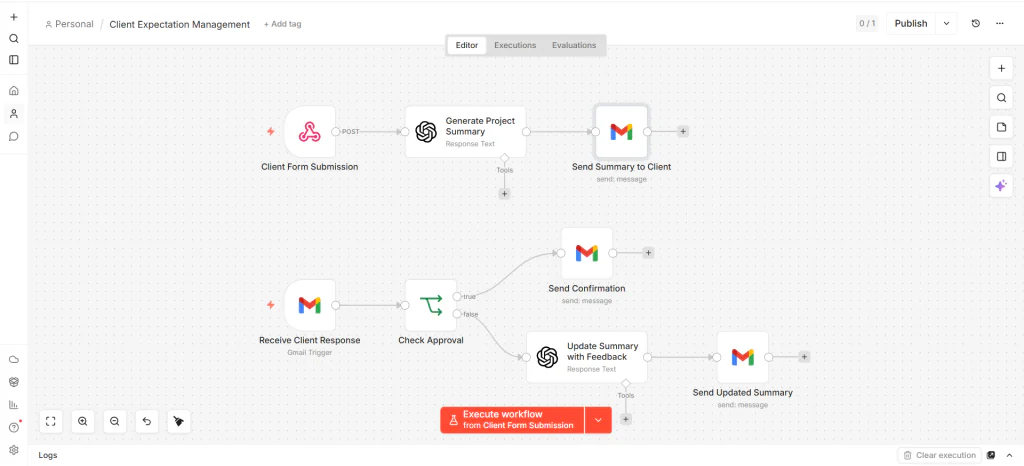
A consultant receives a new project request through a structured form. Instead of starting with long email exchanges, the workflow sends the project details directly to OpenAI, which generates a clear summary containing the project scope, deliverables, and timeline.
The consultant then sends this summary to the client for validation. If the client requests changes, the system updates the summary automatically and sends a revised version. Once approved, the consultant confirms the project scope before starting execution.
This approach keeps communication structured from the beginning and reduces misunderstandings during delivery.
Simple n8n Structure
In practice, this system works better in n8n when separated into two lightweight workflows instead of one large automation. The first workflow handles project intake and summary generation, while the second workflow manages client replies and approval decisions.
Minimal Workflow Structure
This implementation separates the automation into two lightweight workflows. The first workflow generates and sends the project summary, while the second workflow manages client replies and approval decisions.
Answer Section
An AI workflow for managing client expectations uses structured inputs, continuous tracking, and validation loops to maintain alignment. It converts client input into clear expectations, monitors changes, and requires approval before implementation. This system reduces scope drift, improves communication consistency, and ensures predictable project delivery.
FAQ
How is this different from onboarding?
Onboarding collects initial data, while this system manages expectations throughout the entire project lifecycle.
Do I need complex tools to implement this?
You can start with simple automation platforms and structured templates, then expand as needed.
Can this workflow work for small projects?
Yes, you can reduce the number of checkpoints while keeping the same structure.
What is the main benefit of AI in this system?
AI standardizes communication and detects misalignment early, which reduces revisions.
How does it prevent scope creep?
It enforces validation for every change and compares it with the original expectations before approval.
1 thought on “AI Workflow for Managing Client Expectations”