Small businesses often use multiple communication tools without connecting them into one operational system. A lead arrives through a website form, support requests come from WhatsApp, meetings are scheduled through Google Calendar, and project discussions continue inside email threads or Trello boards. As communication volume increases, teams lose visibility because information remains distributed across disconnected platforms.
This operational problem affects response speed, follow up quality, and internal coordination. Team members spend time searching for previous conversations instead of responding to clients. Important requests get buried inside inboxes, while duplicated tasks appear because systems do not exchange information automatically.
AI client communication systems help small businesses connect forms, email, messaging apps, calendars, project tools, and internal notifications into one structured workflow. Instead of managing communication manually between platforms, businesses can automate routing, summaries, follow ups, and client tracking while keeping every interaction visible across the team.
Why Communication Systems Break as Businesses Grow
Most small businesses build their communication stack gradually. They start with Gmail, then add WhatsApp Business, scheduling tools, internal chat platforms, and project management software. Each tool solves one immediate operational need, yet the business never creates a unified communication structure.
Over time, communication becomes fragmented. Employees manually transfer information between systems, which increases delays and creates inconsistencies. Clients often repeat the same information multiple times because the business lacks centralized communication visibility.
This problem becomes especially visible during onboarding and project delivery. Businesses struggling with onboarding confusion can also read
Why Clients Drop After Onboarding, which explains how disconnected processes reduce client retention.
The Role of AI Inside Communication Systems
AI tools now function as operational coordination layers instead of isolated assistants. Businesses no longer use AI only for content generation or chatbots. Instead, AI analyzes communication, routes requests, summarizes conversations, generates structured outputs, and supports workflow automation between tools.
When connected correctly, AI systems reduce coordination work between employees and software platforms. This allows businesses to create faster and more organized communication without implementing expensive enterprise infrastructure.
An effective AI communication system usually combines multiple tools where each component performs a different operational role. Workflow platforms handle automation logic, AI models process communication data, while communication tools manage delivery and tracking.
Core Layers of an AI Communication System
Communication Intake
The intake layer collects incoming communication from different channels including forms, email, messaging apps, and scheduling tools. The objective is centralization. Even when clients use different channels, the business still needs one operational entry process.
Businesses commonly use Tally, Typeform, Gmail, WhatsApp Business, and chat widgets in this layer. AI improves the process by identifying urgency, categorizing requests, and extracting client intent automatically.
Workflow Coordination
Workflow automation platforms connect communication systems together. Tools such as n8n, Zapier, and Make transfer information between forms, AI models, email systems, databases, CRMs, and internal notifications.
For example, after a lead submits a form, the workflow can automatically generate a client record, assign the request to the correct employee, create follow up tasks, and send confirmation emails without manual intervention.
Businesses comparing workflow automation tools can also review
How to Choose Zapier, Make, or n8n for Small Businesses.
AI Processing
The AI processing layer transforms raw communication into operational information. AI models summarize conversations, classify service requests, identify priorities, generate draft replies, and organize client context.
This reduces cognitive overload for employees because teams spend less time organizing communication manually.
Communication Delivery
This layer manages outgoing communication through Gmail, WhatsApp, Slack, SMS systems, and client portals. AI supports consistency by generating structured responses and follow up messages while preserving operational context.
Businesses building automated communication responses can also explore
AI Prompts for Customer Service Replies.
Visibility and Tracking
Communication systems fail when businesses cannot monitor interactions across tools. Visibility platforms such as Notion, Airtable, ClickUp, and CRMs centralize communication history, follow ups, and project status.
AI can also generate summaries, delayed response alerts, unresolved task reports, and communication insights automatically.
Practical Example, Connecting Client Communication for a Small Marketing Agency
A small marketing agency with four employees struggled to manage communication across Gmail, WhatsApp, Google Calendar, and Trello. New leads arrived through the website contact form, while existing clients often sent requests through email and messaging apps. Because the systems were disconnected, project managers frequently missed follow ups, duplicated tasks, and spent time searching for previous conversations before replying.
The agency decided to create a lightweight AI communication system instead of implementing a large CRM platform. They connected Tally forms, Gmail, WhatsApp Business, Google Calendar, Notion, Slack, OpenAI, and n8n into one workflow structure.
Once a lead submitted the website form, n8n automatically created a client entry inside Notion and sent the information to the shared Gmail inbox. At the same time, OpenAI analyzed the inquiry and generated a short summary containing the client objective, service category, estimated urgency level, and preferred communication channel.
The workflow then assigned the request automatically. SEO related inquiries went to the SEO manager, while paid advertising requests moved to the advertising specialist. Each team member received a Slack notification with the AI generated summary attached directly inside the message.
After the first discovery call, the meeting recording passed through an AI transcription tool. The system extracted action points, deadlines, and client expectations automatically before storing them inside the Notion workspace.
The operational impact became visible within the first month. Average first response time dropped from nearly six hours to less than forty minutes during working hours. Internal follow up errors also decreased because every communication event became traceable inside the workflow.
The agency did not replace employees with AI. Instead, the system reduced coordination work between tools so the team could focus on client delivery and campaign execution.
Example of an AI Client Communication Workflow in n8n
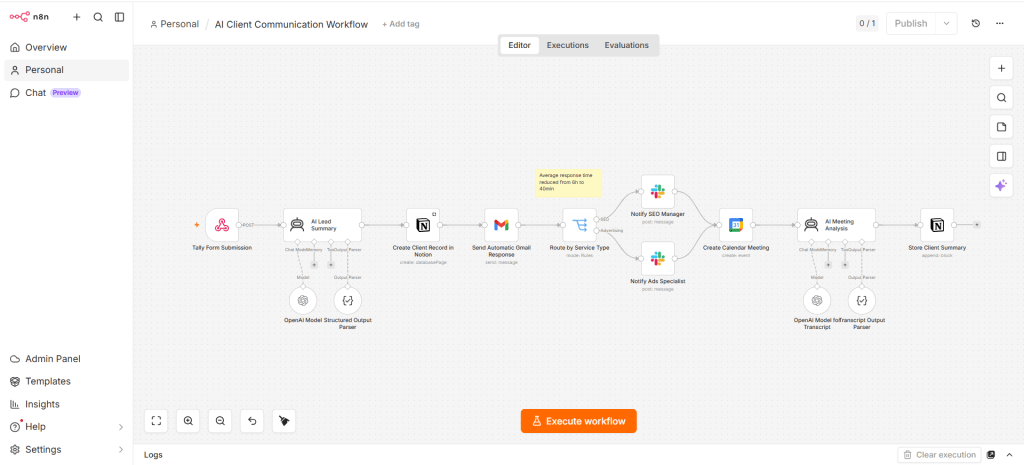
The workflow above demonstrates how a small business can centralize communication operations without relying on a large CRM system. The process starts with a Tally form submission and continues through AI analysis, automated email responses, internal routing, Slack notifications, meeting scheduling, and transcript processing.
Instead of moving information manually between systems, the workflow keeps every communication event connected. This improves visibility while reducing operational delays.
How Different AI Tools Function Inside the System
| Tool Category | Operational Role | Example Use |
|---|---|---|
| Workflow Automation | Connects systems together | Send form data into Notion and Slack |
| AI Models | Processes communication | Generate summaries and categorize leads |
| Shared Inbox Tools | Centralizes conversations | Track support requests and follow ups |
| Scheduling Platforms | Coordinates meetings | Send reminders and meeting confirmations |
| Knowledge Management Tools | Stores communication context | Maintain searchable client records |
Common Mistakes When Building AI Communication Systems
Adding AI Before Defining Processes
Businesses often implement AI tools before organizing their communication workflow. This creates automation around existing confusion instead of solving operational issues.
Using Too Many Channels
Supporting every communication platform simultaneously increases fragmentation. Small businesses should centralize communication first before expanding channels.
Overcomplicating CRM Infrastructure
Many small businesses adopt enterprise CRM systems too early. In practice, lightweight workflow automation combined with AI tracking often works more effectively.
Businesses evaluating this issue can also read
When SMBs Should Replace CRM With a Simple AI Lead Tracking System.
Ignoring Internal Communication
Client communication also depends on internal coordination. Teams need structured notifications, handoff systems, and centralized visibility.
How AI Improves Response Speed Without Losing Context
Fast responses matter because delayed communication often reduces trust and lead conversion rates. However, speed alone does not solve communication problems. Businesses also need continuity and visibility.
AI workflows help businesses respond quickly while preserving context. Automated acknowledgment messages, AI summaries, and centralized communication records reduce delays without removing human involvement.
Businesses struggling with response delays can also explore
How Slow Response Times Cause Lead Loss in Small Businesses.
FAQ
What is an AI client communication system?
An AI client communication system connects communication tools, workflows, AI models, and tracking platforms into one operational process.
Do small businesses need a CRM for communication systems?
Not always. Many small businesses operate effectively with lightweight AI workflows connected through automation platforms like n8n.
Which tools are commonly used in AI communication systems?
Businesses commonly use n8n, Zapier, OpenAI, Gmail, Slack, Notion, WhatsApp Business, and scheduling platforms.
Can AI automate customer communication completely?
AI can automate summaries, routing, acknowledgments, reminders, and basic replies. However, businesses still rely on human review for complex communication and relationship management.
Why do communication systems become fragmented?
Communication systems become fragmented when businesses add multiple tools without workflow integration or centralized visibility.