
Many small and medium businesses collect client information through emails, scattered forms, or manual calls. This approach creates gaps in data, delays project start, and increases back and forth communication. A structured client intake system with AI forms solves this by capturing complete, usable data at the first interaction and preparing it for immediate operational use.
A client intake system with AI forms captures structured data at the first touchpoint, validates inputs, and routes information into workflows. This guide explains how to design form logic, connect automation tools, and ensure data completeness. The result is faster onboarding, fewer errors, and consistent project execution without manual follow up.
Why Client Data Is Often Incomplete
Most SMBs rely on basic forms or email exchanges to collect client information. These methods depend on the client’s interpretation of what is required, which leads to missing fields, vague answers, or inconsistent formats. As a result, teams spend time clarifying details instead of starting work.
This issue becomes more visible when businesses scale. A higher volume of clients increases variability in responses, which reduces data reliability. Without structured validation and guided inputs, even well designed forms fail to capture usable information.
The operational impact appears quickly. Teams delay project kickoff, misinterpret client needs, and repeat communication cycles. Over time, this reduces efficiency and affects client experience. A structured intake system addresses this at the source by controlling how data enters the workflow.
Where AI Forms Change the Process
AI forms introduce logic, validation, and adaptive questioning into the intake process. Instead of static fields, the form reacts to user input and adjusts the next questions. This ensures relevance and completeness without overwhelming the client.
For example, when a client selects a service type, the form can trigger a specific set of questions related to that service. It can also enforce structured answers by converting free text into categorized data. This reduces ambiguity and prepares the data for automation.
In practice, AI forms act as the first layer of system design. They define what data enters the system and how it is structured. Once configured, they reduce manual corrections and improve consistency across all client submissions.
System Design Overview
A client intake system with AI forms includes four main components. Each component plays a specific role in ensuring data quality and operational flow.
Input Layer
This layer consists of the AI powered form that clients interact with. It includes conditional logic, validation rules, and guided inputs. The goal is to capture structured data that aligns with business requirements.
Processing Layer
Once the client submits the form, the system processes the data. AI can summarize responses, extract key variables, and standardize formats. This step prepares the data for downstream workflows.
Routing Layer
The system sends the processed data to the appropriate tools. This can include task management platforms, CRMs, or communication systems. Routing logic depends on the type of client and the service requested.
Output Layer
The final layer generates outputs such as internal briefs, task lists, or confirmation messages. These outputs ensure that teams can act immediately without additional clarification.
Prerequisites Before Setup
Before building the system, define the data requirements clearly. Identify what information is necessary to start a project without follow up. This includes business details, project scope, timelines, and assets.
Next, map the workflow that uses this data. Determine where the data will go after submission and how each team will use it. This ensures that the form captures information in a format that matches operational needs.
Finally, select tools based on their role in the system. For example, an automation platform can act as the core routing engine, while the AI form acts as the entry point. Avoid assigning the same role to multiple tools, as this creates redundancy.
Step 1: Design the AI Form Structure
Start by structuring the form into logical sections. Each section should correspond to a specific type of information, such as client details, project requirements, and constraints. This organization helps both the client and the system process the data efficiently.
Use conditional logic to adapt the form based on responses. For example, if a client selects a website project, the form should display questions related to pages, design preferences, and integrations. This keeps the form relevant and reduces unnecessary inputs.
At this stage, define validation rules. Require specific formats for key fields such as email, budget range, and deadlines. This ensures that the data meets minimum quality standards before submission.
Step 2: Integrate AI for Data Structuring
After designing the form, integrate AI to process the responses. This can include summarizing long answers, extracting key variables, and categorizing inputs. The goal is to transform raw data into structured information that systems can use directly.
For example, if a client describes their project in free text, the AI can extract the main objectives, deliverables, and constraints. This reduces the need for manual interpretation and speeds up decision making.
When integrated correctly, AI acts as a processing layer that bridges the gap between user input and system requirements.
Step 3: Connect Automation Workflows
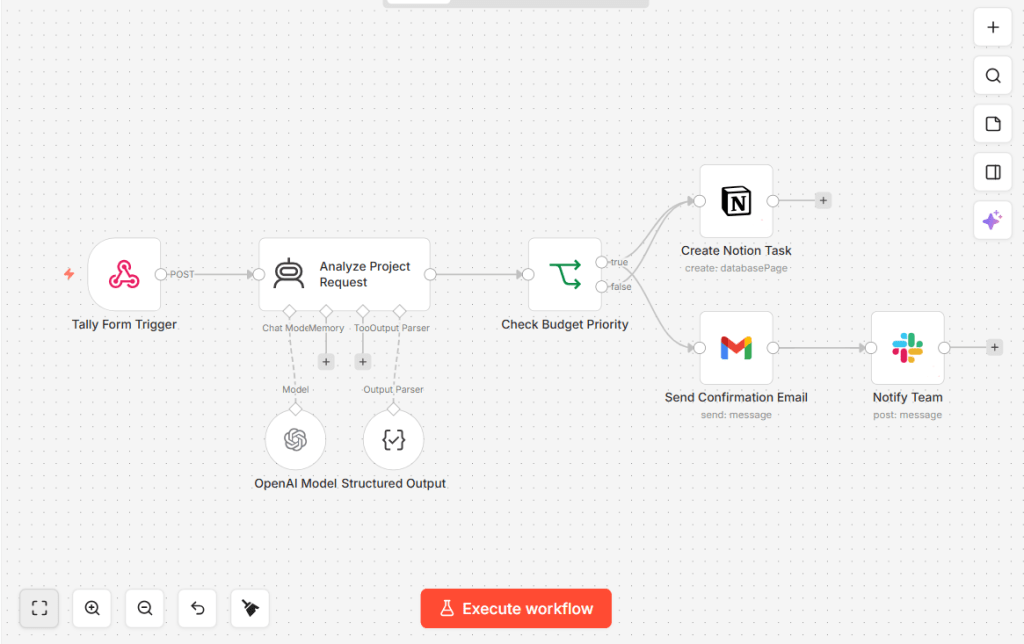
Once the data is structured, connect it to automation workflows. Use an automation platform to route the data to the right destinations. This can include creating tasks, updating records, or sending notifications.
For example, after form submission, the system can create a project in a task management tool, assign team members, and generate a summary brief. This removes manual setup and ensures consistency across projects.
If you need a detailed walkthrough of automation setup, refer to this step by step onboarding automation guide, which explains how to connect workflows across tools.
Step 4: Configure Decision Logic
Decision logic determines how the system reacts to different inputs. For example, high budget clients may trigger a priority workflow, while smaller projects follow a standard process.
Define rules based on key variables such as budget, timeline, and service type. These rules ensure that each client receives the appropriate level of attention and resources.
This step is critical for scaling operations. Without decision logic, all clients enter the same workflow, which reduces efficiency and increases errors.
Step 5: Generate Operational Outputs
The system should produce outputs that teams can use immediately. This includes project briefs, task lists, and internal notes. These outputs should be clear, structured, and aligned with team workflows.
For example, a project brief can include client goals, deliverables, and deadlines. This allows teams to start work without additional clarification.
At this stage, the intake system completes its role by converting client input into actionable data.
Testing and Optimization
After setup, test the system with real scenarios. Use sample clients to identify gaps in the form and workflow. Check whether all required data is captured and whether outputs are usable.
Monitor submission quality and completion rates. If clients abandon the form or provide incomplete data, adjust the structure and logic. This iterative process improves system performance over time.
In practice, optimization focuses on reducing friction while maintaining data quality. Small changes in question phrasing or logic can significantly improve results.
Common Failures in Client Intake Systems
Many SMBs build intake systems that still rely on manual intervention. This happens when forms lack validation, workflows are incomplete, or AI is not integrated effectively.
Another common issue is overloading the form with too many questions. While the goal is to capture complete data, excessive inputs can reduce completion rates. Balance detail with usability.
For a deeper analysis of onboarding issues, refer to this breakdown of onboarding failures in small businesses, which explains common operational gaps.
How This System Fits Into a Larger Workflow
The client intake system acts as the entry point of a broader onboarding system. It ensures that all downstream processes receive clean, structured data.
Once implemented, it integrates with tools and workflows that handle project execution, communication, and tracking. For a full system perspective, see this guide on AI client onboarding systems, which explains how intake connects to the entire process.
Additionally, tool selection plays a role in system performance. If you need guidance on choosing automation tools, review this analysis of tools used in onboarding systems.
Boundary of This Article
This article focuses on designing and implementing AI forms for client intake and structuring data at the entry point. It does not cover full onboarding automation workflows or tool comparisons in depth.
For workflow automation, refer to the onboarding implementation guide mentioned earlier. For tool selection, use the dedicated tool analysis article. These resources extend the system beyond the intake layer.
FAQ
What is a client intake system with AI forms
It is a structured system that collects client data through adaptive forms, processes it using AI, and routes it into workflows for immediate use.
Why do SMBs struggle with client data collection
They rely on manual methods or static forms, which lead to incomplete and inconsistent data.
How does AI improve intake forms
AI adds logic, validation, and data structuring, which ensures completeness and usability.
What tools are needed for this system
You need an AI capable form builder, an automation platform, and optional processing tools for summarization and categorization.
How long does it take to implement
Basic systems can be set up in a few hours, while advanced workflows require testing and optimization over several days.
This article does not compete with any existing UsefulAIHub article in topic, intent, or system layer. It focuses specifically on the intake layer and data capture logic, which complements existing onboarding and automation resources.
1 thought on “How to Create a Client Intake System with AI Forms”